Analysis
4.5
Overall
Price
4
Ease of Use
4.7
Features
4.5
Support
4.6
Pros
- Good uptime
- Good customer support
- Highly secured and easy to use
Cons
- Cost on the higher side
SiteGround Review
SiteGround is one of the most popular website hosting services, which is known for delivering great performance, uptime, and ease of use. It is one of the most popular website hosting services that is widely used by newbies, businesses, and WordPress users.
With features such as caching, daily backups, and customer support, SiteGround is known for delivering great speed and security. In this review, we will take a deeper look at SiteGround’s features, ease of use, and whether it lives up to its reputation.
Pros:
- Strong performance features, including Google Cloud infrastructure, built-in CDN, SuperCacher, and WordPress speed optimization tools.
- Excellent built-in security with free SSL, daily backups, WAF protection, anti-bot systems, and proactive monitoring.
- Beginner-friendly dashboard and tools, with Site Tools, one-click WordPress setup, and free WordPress migration.
- Good support coverage with 24/7 live chat, tickets, phone support, and an AI assistant for quick help.
Cons
- Renewal pricing is much higher than the heavily discounted intro pricing, especially on annual plans.
- The entry-level StartUp plan is limited to one website, about 10,000 monthly visits, and 10 GB of storage.
- Some advanced features, such as staging, Git, manual backup slots, and priority-style extras, are reserved for higher-tier plans.
- Support access can feel slightly indirect because SiteGround routes users through its Help Center and AI system before offering the best channel.
SiteGround Overview
SiteGround also offers a solid set of features useful to both novice and experienced users. Overall, the platform is designed to help you have everything you need to build, run, and grow a website without making things too complicated.
To begin with, SiteGround offers a range of hosting options. This includes:
Shared hosting
Reseller hosting
Cloud hosting.
Although they do not offer VPS or dedicated servers, they do offer cloud hosting options designed to handle larger traffic and scale with your website. This is perfect for most users, especially small businesses, bloggers, and agencies.
One of the most interesting aspects of SiteGround is its website management experience. Instead of using the traditional cPanel for website management, they have developed their own custom interface called Site Tools.
This interface is clean, simple, and easy to use. You can easily manage everything related to your website in this interface. Additionally, you can pin the tools you use most, making the interface even more convenient, especially if you are running multiple websites or handling client websites.
For beginners, SiteGround also offers a free website builder with each of its plans. This lets you create a professional-looking website without coding. It’s also easy to use and will automatically optimize your design for mobile devices. It also comes with great extras, such as AI-generated content, images, and SEO and analytics tools to help you get your entire website up and running.
For WordPress users, SiteGround is a great choice. It’s incredibly simple to install WordPress in just a few clicks and then use a wizard to get everything set up and running smoothly. It also comes with great extras, such as caching that will really speed up your WordPress installation, and tools like a WordPress Starter plugin that will simplify the entire installation process. It also lets you automatically update your WordPress installation, themes, plugins, and PHP version.
Another area where SiteGround excels is in website migration. They offer both automated and assisted migration services. For the automated migration service, they use a plugin that lets you easily transfer your WordPress site by simply inserting a token. This minimizes the chances of errors and saves time compared to the manual migration option. For the assisted service, they also offer a professional migration service, sometimes free during the sign-up process for some plans.
For the more technical users, SiteGround also offers several useful tools. These include using WP CLI and SSH, as well as managing multiple projects. However, some of the more advanced tools are only available for the higher plans, such as the GoGeek plan.
What Are the Key Features SiteGround Offers?
SiteGround also offers a solid set of features useful to both novice and experienced users. Overall, the platform is designed to help you have everything you need to build, run, and grow a website without making things too complicated.
To begin with, SiteGround offers a range of hosting options. This includes:
- Shared hosting
- Reseller hosting
- Cloud hosting.
Although they do not offer VPS or dedicated servers, they do offer cloud hosting options designed to handle larger traffic and scale with your website. This is perfect for most users, especially small businesses, bloggers, and agencies.
One of the most interesting aspects of SiteGround is its website management experience. Instead of using the traditional cPanel for website management, they have developed their own custom interface called Site Tools.
This interface is clean, simple, and easy to use. You can easily manage everything related to your website in this interface. Additionally, you can pin the tools you use most, making the interface even more convenient, especially if you are running multiple websites or handling client websites.
For beginners, SiteGround also offers a free website builder with each of its plans. This lets you create a professional-looking website without coding. It’s also easy to use and will automatically optimize your design for mobile devices. It also comes with great extras, such as AI-generated content, images, and SEO and analytics tools to help you get your entire website up and running.
For WordPress users, SiteGround is a great choice. It’s incredibly simple to install WordPress in just a few clicks and then use a wizard to get everything set up and running smoothly. It also comes with great extras, such as caching that will really speed up your WordPress installation, and tools like a WordPress Starter plugin that will simplify the entire installation process. It also lets you automatically update your WordPress installation, themes, plugins, and PHP version.
Another area where SiteGround excels is in website migration. They offer both automated and assisted migration services. For the automated migration service, they use a plugin that lets you easily transfer your WordPress site by simply inserting a token. This minimizes the chances of errors and saves time compared to the manual migration option. For the assisted service, they also offer a professional migration service, sometimes free during the sign-up process for some plans.
For the more technical users, SiteGround also offers several useful tools. These include using WP CLI and SSH, as well as managing multiple projects. However, some of the more advanced tools are only available for the higher plans, such as the GoGeek plan.
Ease of Use
SiteGround offers a very smooth, beginner-friendly experience, though it is not completely free of minor issues. From the time of sign-up itself, the entire system feels quite simple and easy to use. Creating an account with SiteGround involves just a few steps –
- Selecting a plan
- Registering or connecting a domain
- Finally completing the payment.
Throughout the interface, the language is simple and easy to understand. One major positive aspect of SiteGround is that no add-ons are forced during the time of checkout. This makes the entire buying process much more transparent than competitors. SiteGround excels in its onboarding features. The entire system walks the user through account setup and domain connection using a setup wizard.
The account dashboard is clean and uncluttered, with large menus and sections clearly labeled for billing, websites, and domains. Navigation is very easy, making it simple to find important tools. Another standout feature is their custom control panel, Site Tools.
This panel is more modern and user-friendly than other control panels, enabling users to manage their files, emails, backups, and security settings effectively. Features such as pinning favorite tools and having separate control panels for each site make it extremely convenient, especially when managing several sites at once.
However, there are a few drawbacks to this control panel experience. For instance, there are many upsells throughout this control panel, which can become distracting; however, this can also be seen as a positive, as it is easy to ignore them if desired. Another problem is that certain features, such as domain privacy, are not included in this control panel and incur an extra cost, unlike other control panels.
How Is SiteGround’s Performance?
SiteGround delivers reliable, well-balanced performance across uptime and speed under various testing conditions. One of its biggest strengths is its consistent performance. In various real-world testing conditions using monitoring tools such as UptimeRobot and Better Stack, it has been observed that websites hosted by SiteGround have achieved 100% uptime throughout the testing period, well above its claimed 99.9% uptime.
When it comes to speed tests, SiteGround performs well in this area as well, though results may vary in some cases. In general, speed tests across various regions simulating real users accessing a website have observed average load times of around 2.81 seconds, while desktop speeds were around 2.21 seconds and mobile speeds were around 3.42 seconds. These speeds are within a well-performing zone, though a bit lower than some of its top competitors in this area.
However, more refined, optimized tests conducted with GTmetrix resulted in much faster loading times. The loading time was mostly within the range of 1 to 2 seconds and sometimes less than a second. Other performance parameters, such as Time to First Byte at around 253 ms, Largest Contentful Paint under 500 ms, and Cumulative Layout Shift, indicate SiteGround’s ability to deliver high-performance, reliable user experiences when the site is well optimized.
The primary factor in the website’s high performance is the modern infrastructure and optimization tools provided by SiteGround. It uses Google Cloud infrastructure with multiple global data centers for its sites. This enables low latency and high reliability worldwide. Features such as Ultrafast PHP, MySQL tuning, and SuperCacher are provided to optimize server performance. In addition, the Speed Optimizer plugin included with the service provides dynamic caching, image compression, code minification, and database cleaning. The free CDN also allows loading the site’s content from the server closest to the user.
Customer Support Offered by SiteGround
SiteGround has a great, reliable customer support team, and it has met all expectations across the board. It has quick response times, a friendly support team, and various support options.
However, the way to reach the support team is slightly indirect.
24/7 support is available through various channels, including live chat, phone, tickets, AI, and a knowledge base. For those who like to fix things on their own, the knowledge base is very good. The articles are divided into tutorials and quick help. The tutorials provide detailed information on topics such as creating a WordPress website. In the quick help section, articles are given on frequently asked questions, such as upgrading your account. The articles are written in a simple manner, with step-by-step instructions and pictures, making it very easy for anyone, especially beginners.
However, the only drawback is that there are very few articles on video tutorials, which might be a problem for those who prefer videos as a source of information.
In addition, SiteGround has an AI assistant that has been trained on their knowledge base. It responds quickly and has relevant information with links to in-depth guides. It does not, however, direct you to a human, which in most cases is not really necessary, as you can achieve the same results with the standard search option.
In terms of direct contact, the quality is very high once you are able to speak with a support staff member. The live chat response is extremely quick, taking only a minute or two. The support staff is friendly and knowledgeable, and they can fix your problems quickly. In one instance, a simple problem was solved in five minutes via chat, with clear instructions being given throughout the process. The phone support is equally impressive, with short waiting times of less than 5 minutes, and clear explanations given by the support staff.
For more complex problems, like technical issues with databases, the support team may refer your problem to a specialist who can resolve it within 20 minutes, at no extra cost to you.
The ticket system is a little different from what most companies use. Most companies use general tickets, but SiteGround uses request forms for various operations. This is more effective because problems are addressed by the appropriate department, and communication is not dragged out. The response time to these tickets is also quick, within a couple of hours, which is much quicker than most companies’ response time.
The disadvantage of this support system is that when one tries to access it, there is a problem with its “Contact Us” page. There is no clear option for live chat or calls. One has to go through various options and solutions before one can speak to a support team member. While this is effective because it prevents the support team from wasting time and because the wait is not long, it is frustrating when one needs support urgently. There are also some options that are not immediately clear.
Pricing of SiteGround
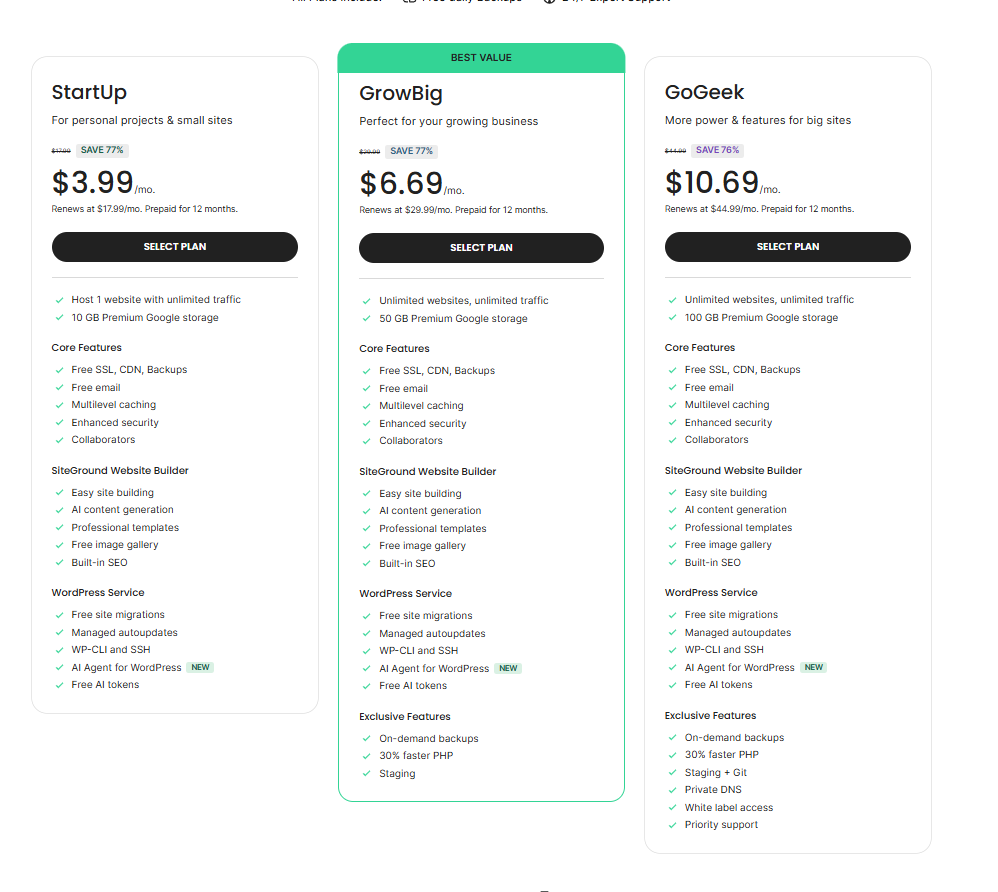
SiteGround positions itself as a premium hosting provider, and this is reflected in its pricing. They offer good features at a certain price, but the price is quite high after the introductory period compared to other hosting providers’ plans.
SiteGround positions itself as a low-priced hosting provider. This is especially true in cases where people are ready to commit to their hosting services for a longer period, such as 12 months or 24 months. In any case, the basic plans are quite attractive with a low price tag. Therefore, SiteGround is a great choice for people who are new to hosting services.
In the case of a 12-month term, SiteGround’s StartUp plan is priced at $2.99/month, GrowBig is priced at $4.99/month, and GoGeek is priced at $7.99/month.
However, the price is quite high after the introductory period. This is where most people believe that the price is quite high in comparison with what other hosting providers are offering. SiteGround’s pricing is also dependent on the prepaid term.
However, it still manages to provide good value for money, especially with its initial plan, StartUp. While most cheap web hosting providers provide limited features with their initial plan, SiteGround provides its initial plan with some high-end features, such as:
- Daily backups
- A free CDN
- Unmetered traffic
- Unlimited databases
- WordPress management tools
- Caching and security tools
These features are usually offered as an extra charge with other web hosts. This is why this web host is more expensive than other web hosts.
However, as one moves up the scale with the GrowBig and GoGeek plans, this web host becomes more suitable for advanced users and agencies, and also for websites with heavy traffic, as it comes with more features, such as:
- The ability to host unlimited websites
- Staging tools
- On-demand backups
- Better PHP speed
- Better server resources
They have been designed to accommodate increased traffic and include recommended monthly visit counts of around 100,000 and 400,000 for the GrowBig and GoGeek plans, respectively. However, storage space limits such as 10 GB, 50 GB, and 100 GB may pose problems for media-rich sites in the future.
Note: For a 12-month term, SiteGround currently lists StartUp at $2.99/month, GrowBig at $4.99/month, and GoGeek at $7.99/month. These renew at $17.99/month, $29.99/month, and $44.99/month, respectively.
Security
While reviewing SiteGround, it was noticed that the platform offers end-to-end security solutions for the website. Firstly, the user is introduced to various security options, such as the free SSL feature, which ensures that the information shared between the website and the user is encrypted.
Secondly, the platform offers an end-to-end security solution, which protects the website from malicious activities, such as bots, through the web application firewall.
To improve the security of the website, SiteGround offers various account security options, such as two-factor authentication, as well as the isolated server feature, which is available with shared hosting services, ensuring that if the website is compromised, the other websites are not affected.
Another major advantage this software has over others is automated updating and patching, which means there is no room for vulnerabilities from outdated applications. Another feature that the software has is daily backups, which act as a safety net in the event that something goes wrong. This is particularly important if you are running a business website or even WordPress, as security is an issue without complexity.
It should be noted that not all the features are integrated into the system, as some features, such as the advanced malware scanner, may require an additional cost. However, the software is aimed at preventing, and it is quite user-friendly.
Is SiteGround Right for You?
SiteGround is a good option if you need reliable web hosting with high performance, strong features, and strong support. It is a good option for you if you are a beginner, a small business owner, or a WordPress user due to its simplicity and reliability. Features such as daily backups, a free CDN, and managed tools are very useful and are included with no configuration required.
SiteGround may not be a good option for you if you are on a tight budget because it can prove to be costly for you in the long run due to high renewal prices.
SiteGround is a good option for you if you need reliable web hosting with high performance, good features, and good support. If you need a low-cost option, you may find better deals with other web hosting services.
SiteGround Alternatives
1. Hostinger: Fast and Budget-Friendly
If you’re looking for a faster, lower-priced alternative, Hostinger is a great choice. This web host promises extremely fast loading times, with the website loading in less than a second. It also boasts reliable uptime. What really sets it apart, though, is its lower renewal rates, making it a more cost-effective alternative to SiteGround while offering similar features. The hPanel is also easy to use, making it a great choice for beginners. However, it is more focused on self-service support.
2. IONOS: Affordable with Personal Support
Another web host that really shines is IONOS. This is because it is budget-friendly, with a personal consultant available for any questions you may have. This is especially useful if you’re not tech-savvy. What’s more? It also delivers reliable performance with fast load times. However, it doesn’t come with free migration.
3. HostArmada: Cloud-Based Reliability
HostArmada is a cloud-based hosting provider. This means that they will distribute your website across multiple servers. This makes for a more reliable hosting service. Additionally, they have free migration and high speeds. However, backup storage is limited on lower plans.
4. InterServer: Fixed Pricing Model
InterServer is recommended for those who want a fixed pricing plan. This is because they offer a price-lock guarantee. This means you will not have to worry about future price increases. Additionally, they have free migrations and good speeds. However, they only have servers in the US.
5. Liquid Web: Fully Managed Hosting
Liquid Web is recommended for those who want a fully managed hosting plan. This is because they have features such as auto-scaling and good speeds. Additionally, they have daily backups. Although this may be a bit pricey at first, it is good for those who plan to grow their business in the future.
Conclusion
If you are looking for a reliable, fast, and feature-rich hosting service that is perfect for both beginners and experts, then SiteGround is a great choice. SiteGround offers a great balance of speed, security, and user-friendly features, with top-notch 24/7 customer support. Even though the price is a bit higher after the initial period, it is worth paying more for such a great service. If you are willing to pay more for quality, features, and customer support rather than just focusing on price, then SiteGround is a great, reliable, and trustworthy choice.
Frequently Asked Questions (FAQs)
Yes, SiteGround is good for beginners as it is easy to use and has a simple interface.
Yes, SiteGround is good for performance as it is fast and efficient.
SiteGround is cheap to start, but is expensive to renew. This is because the service is of good quality.
SiteGround provides free WordPress website migration using the plugin. However, for other sites, you may have to pay for the migration.
The best alternatives to SiteGround include Hostinger, IONOS, HostArmada, InterServer, Liquid Web, and many others.